
What Is Meta Ads? A Complete Beginner's Guide (2026)
If you've ever seen an ad while scrolling through Facebook or Instagram, that was a Meta Ad. Meta Ads is one of the most powerful advertising platforms in the world, used by businesses of every size to reach billions of people across Facebook, Instagram, Messenger, and beyond.
But what exactly is Meta Ads? How does it work? And more importantly, how can you use it to grow your business?
In this complete beginner's guide, I'll walk you through everything you need to know about Meta Ads in 2026, from the basics of what it is, to how campaigns are structured, to what it costs, and how to get started.
What you'll learn in this guide: what Meta Ads is and how it works, the different ad formats and placements, how much it costs, the campaign structure, and the exact steps to run your first campaign.
Table of Contents
- What Is Meta Ads?
- Meta Ads vs Facebook Ads: What Changed?
- How Does Meta Ads Work?
- Meta Ads Formats and Placements
- Campaign Structure: The 3 Levels
- How Much Does Meta Ads Cost?
- Who Should Use Meta Ads?
- How to Get Started with Meta Ads
- Pros and Cons of Meta Ads
- Frequently Asked Questions
1. What Is Meta Ads?
Meta Ads is the paid advertising platform owned and operated by Meta Platforms Inc. It allows businesses, marketers, and entrepreneurs to create and run paid advertisements across Meta's family of apps, primarily Facebook, Instagram, Messenger, and the Audience Network (a collection of third-party apps and websites).
Meta Ads was formerly known as Facebook Ads. When Facebook rebranded to Meta in October 2021, the advertising platform was updated to the Meta Ads name. However, the core functionality, the Ads Manager interface, and how campaigns work remain essentially the same.
Think of Meta Ads as a giant billboard system, except instead of random people passing by, you can choose exactly who sees your ad based on their age, location, interests, behavior, and even past interactions with your business.
- 3.2B Daily active users across Meta's platforms.
- 10M+ Active advertisers on Meta globally.
- $131B Meta's annual ad revenue (2023).
- $ 1/day minimum daily budget to start.
Key Definition
Meta Ads = the paid advertising system that lets you show targeted ads to specific audiences on Facebook, Instagram, Messenger, and partner sites. You control who sees your ad, how much you spend, and what action you want people to take.
2. Meta Ads vs Facebook Ads: What Changed?
If you're confused by the name change, you're not alone. Here's the quick answer: Meta Ads and Facebook Ads are the same thing.
In October 2021, Mark Zuckerberg announced that Facebook Inc. was rebranding to Meta Platforms Inc. to reflect the company's focus on building the "metaverse." As part of this rebrand:
- Facebook Inc. → Meta Platforms Inc.
- Facebook Ads Manager → Meta Ads Manager
- Facebook Business Manager → Meta Business Manager
- Facebook Pixel → Meta Pixel
The ads themselves still appear on Facebook and Instagram. The targeting options, campaign structure, and billing system are all unchanged. The rebrand was primarily a name change, not a platform overhaul.
📖Related reading: Facebook Ads vs Meta Ads: What's the Difference? (Full Comparison)
3. How Does Meta Ads Work?
Meta Ads works through a real-time auction system. Every time a person opens Facebook or Instagram, Meta runs an instant auction to decide which ad to show them. Thousands of advertisers compete for the same ad slots, and the winner isn't always whoever bids the most money.
The Meta Ads Auction: 3 Factors That Decide Who Wins
Meta's algorithm considers three factors in every auction:
- Bid amount: how much you're willing to pay for a result (click, lead, purchase)
- Estimated action rates indicate how likely the specific person is to take the action you want (Meta predicts this based on their behavior history)
- Ad quality and relevance: how good and relevant your ad is to the audience seeing it (based on engagement, feedback, and hide rates)
This means a well-crafted, relevant ad can beat a higher bid from a competitor. Good creative and targeting matter as much as budget.
The Role of the Meta Pixel
The Meta Pixel is a small piece of tracking code you install on your website. It tells Meta what actions visitors are taking, which pages they visit, what products they view, whether they complete a purchase, and more.
This data does two critical things:
- It helps Meta's algorithm find more people like your best customers (called Lookalike Audiences)
- It allows you to retarget people who visited your website but didn't convert
Important: Without the Meta Pixel installed on your website, you're leaving significant performance on the table. Installing Pixel is one of the first things you should do before running any campaign. See our step-by-step guide to installing Meta Pixel on WordPress →
Targeting: Reaching the Right People
What makes Meta Ads uniquely powerful is its targeting precision. Meta has collected data on billions of users over two decades, including interests, behaviors, demographics, purchase history, and life events. You can use this data to target your ads with remarkable specificity.
For example, you can target: women aged 28–40, living in Dhaka, who are interested in online fitness coaching, have visited your website in the last 30 days, and who have a household income in the top 25%. No other platform offers this level of targeting granularity at scale.
4. Meta Ads Formats and Placements
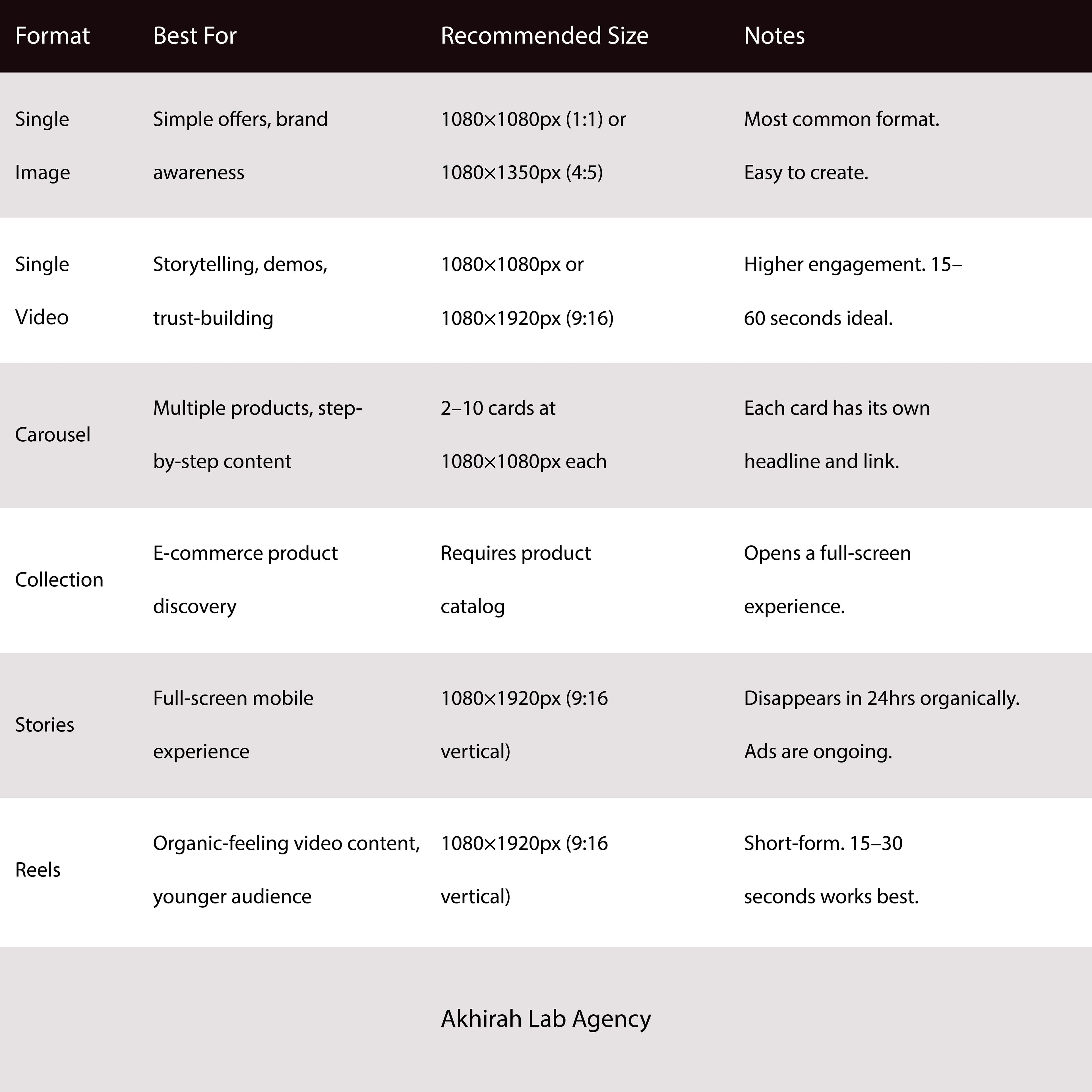
Meta Ads supports multiple creative formats, each suited to different goals and audiences. Here's a breakdown of the main formats and where they appear:
Ad Formats
Ad Placements
Your ads can appear across multiple locations within Meta's ecosystem. The main placements are:
- Facebook Feed the main news feed on desktop and mobile. Highest reach, works for all ages.
- Instagram Feed: the scroll feed on Instagram. Best for visual, high-quality creative targeting 18–40 age groups.
- Facebook & Instagram Stories full-screen vertical ads. Very immersive. Best with vertical video.
- Facebook & Instagram Reels short-form video placement. High organic feel when done well.
- Facebook Marketplace ads appear in the Marketplace tab. Good for local and product-based businesses.
- Audience Network Meta's partner apps and websites. Extends reach beyond Meta's own apps at a lower CPM.
- Messenger ads appear in the Messenger inbox. Good for direct response.
Beginner tip
When starting, use Advantage+ Placements Meta's automatic placement option. It uses AI to show your ad wherever it performs best at the lowest cost. You can always refine placements later once you have data.
5. Campaign Structure: The 3 Levels
Every Meta Ads campaign is organized into three hierarchical levels. Understanding this structure is essential, as it determines how your budget is spent, who sees your ads, and what creative they see.
Level 1: Campaign
The Campaign is the top level. Here, you set one thing: your objective, what you want Meta's algorithm to optimize for. The main objectives are:
- Awareness reaches as many people as possible
- Traffic sends people to your website or landing page
- Engagement gets likes, comments, shares, and page follows
- Leads collect names, emails, and phone numbers (best for service businesses)
- App Promotion drives app installs and in-app actions
- Sales drive purchases on your website or in-app
Choose your objective carefully. Meta shows your ad to people who are most likely to take the action you selected. If you choose Traffic but you actually want leads, you'll get website visitors but very few enquiries. Match your objective to your actual business goal.
Level 2: Ad Set
The Ad Set is the middle level where you define who sees your ad and how much you spend:
- Audience who you want to target (age, location, interests, custom audiences)
- Placements where your ad appears (Feed, Stories, Reels, etc.)
- Budget how much you spend per day or over the campaign lifetime
- Schedule when your ads run (all day, or specific hours)
- Bid strategy: how Meta bids in auctions on your behalf
Level 3: Ad
The Ad is the creative that the user actually sees. This includes:
- The image or video
- The primary text (main copy)
- The headline
- The call-to-action button (Learn More, Sign Up, Shop Now, etc.)
- The destination URL
Real example from Akhirah Lab:
Campaign: Lead Generation (Objective: Leads)
Ad Set: Business owners in Dhaka, 28–50 years old, interested in business automation
Ad: Video "Does your business lose leads because of slow response time?" → Book Free Call CTA
📖Go deeper Meta Ads Campaign Structure Explained: Campaign, Ad Set & Ad (With Examples)
6. How Much Does Meta Ads Cost?
One of the most common questions beginners ask is: "How much do Meta Ads cost?" The honest answer is: it depends, but here are the key numbers you need to know.
There Is No Fixed Price
Meta Ads pricing is dynamic; it's based on an auction. The price you pay depends on your audience, industry, country, time of year, and how competitive your niche is.
Key Pricing Metrics
CPM: Cost per 1,000 impressions $1 – $3/$8 – $15
CPC: Cost per link click $0.10 – $0.50/$1 – $3
CPL: Cost per lead (form submission) $1 – $5/$5 – $30
Minimum Budget to Start
Meta Ads has no minimum spend requirement. Technically, you can start with $1 per day. In practice:
- For testing and learning: $5–$10 per day is a reasonable starting point
- For meaningful results in Bangladesh: $10–$30 per day
- For international (USA/UK) campaigns: $20–$50 per day minimum for consistent data
Important note on the learning phase
Meta's algorithm needs approximately 50 optimization events (leads, clicks, or purchases) within 7 days to exit the "learning phase" and optimize properly. Running with too small a budget means your campaign stays in learning mode indefinitely and delivers inconsistent results.
For an official overview of how Meta Ads pricing works, see Meta's advertising auction and delivery overview.
Watch: Meta Ads Explained in 5 Minutes
7. Who Should Use Meta Ads?
Meta Ads is not for everyone. But it works exceptionally well for specific types of businesses.
Meta Ads Works Best For:
- Service businesses (coaches, consultants, agencies, clinics, law firms). Lead generation campaigns are ideal for collecting client inquiries
- E-commerce businesses, product catalog ads, and retargeting for abandoned carts deliver strong ROAS
- Local businesses (restaurants, salons, gyms) Target people within a specific radius of your location
- Online course creators and coaches build audiences and sell programs to a highly targeted audience
- B2B businesses targeting SMEs. Small business owners are active on Facebook. Reach them with professional targeting
Meta Ads May NOT Be the Best Fit If:
- You sell high-ticket enterprise B2B software (LinkedIn Ads may work better)
- Your audience primarily searches Google before buying (Google Search Ads are more effective)
- You have zero brand awareness budget and need immediate revenue-generating clicks
8. How to Get Started with Meta Ads
Getting your first Meta Ads campaign up and running is simpler than most people think. Here are the six steps to go from zero to your first live ad:
Step 1: Create a Meta Business Account
Go to business.facebook.com and create a Meta Business Suite account using your personal Facebook login. This is your central hub for managing ads, pages, and billing.
Step 2: Connect Your Facebook Page and Instagram Account
Inside Business Manager, add your Facebook Business Page and connect your Instagram account. Your ads will run on these pages.
Step 3: Set Up Your Ad Account and Billing
Create an Ad Account under Business Settings → Ad Accounts → Create. Add your payment method: credit card, PayPal, or local payment options, depending on your country.
Step 4: Install the Meta Pixel
Go to Events Manager, create a Pixel, and install it on your website. This is essential for tracking conversions and building custom audiences.
📖Step-by-step tutorial: How to Install Meta Pixel on WordPress Complete Setup Guide
Step 5: Create Your First Campaign
In Ads Manager, click "Create Campaign." For your first campaign, I recommend:
- Objective: Traffic (easiest to start with) or Leads (if you have a service)
- Audience: A broad Core Audience with basic targeting (age, location, 1–2 interests)
- Budget: $5–$10 per day
- Creative: A single image ad with a clear headline and call to action
Step 6: Publish and Monitor
Once your ad is approved (usually within a few hours), it will start running. Check your results in Ads Manager after 3–4 days. Look at CTR (click-through rate) and CPC (cost per click). If CTR is below 0.5%, test a new creative. If CPC is high, refine your audience.
9. Pros and Cons of Meta Ads
Like any advertising platform, Meta Ads has real strengths and genuine limitations. Here's an honest assessment:
Advantages of Meta Ads
- Unmatched audience size of over 3 billion daily active users across Meta's platforms
- Precise targeting of demographic, interest, behavioral, and custom audience targeting that no other platform matches at this scale
- Low minimum budget starts with as little as $1/day; no minimum spend required
- Multiple ad formats: image, video, carousel, stories, reels, collection, and more
- Powerful retargeting retargets website visitors, video viewers, and lead form openers with high precision
- Strong ROI for service businesses leads to consistently delivering a lower CPL than most other paid channels
- AI-powered optimization Meta's algorithm improves performance automatically as it collects more data
Disadvantages of Meta Ads
- iOS 14+ tracking limitations, Apple's privacy changes reduced data accuracy, making attribution less reliable for iOS users
- As more advertisers join the platform, increasing competition and costs, CPMs have risen year over year
- Learning curve: the platform has many settings; beginners often waste money before understanding how it works
- Ad fatigue: audiences see the same ads repeatedly, causing performance to decline over time if creatives aren't refreshed
- Account restrictions: Meta's automated systems can incorrectly flag and restrict accounts, sometimes without a clear explanation
For detailed documentation on Meta Ads policies and guidelines, visit the Meta Business Help Center.
Related articles you'll find useful
- 📘 Meta Ads Metrics Explained: CPM, CPC, CTR, CPL, ROAS (Full Glossary)
- 📘 Meta Ads Audiences: Core, Custom & Lookalike Explained With Examples
- 📘 Meta Ads vs Google Ads: Which Is Better for Your Business in 2026?
- 📘 How to Create a Meta Ads Lead Generation Campaign (2026 Tutorial)
- 📘 10 Meta Ads Mistakes Beginners Make (And How to Avoid Every One)
Conclusion: Is Meta Ads Worth It in 2026?
Meta Ads remains one of the most effective paid advertising platforms available, especially for service businesses, coaches, and e-commerce brands looking to reach a large, targeted audience at a relatively low cost.
The key to success with Meta Ads is not spending more money; it's understanding how the platform works and making data-driven decisions. Start small, test your creativity, understand your metrics, and scale what works.
To summarize what we covered:
Meta Ads is the paid advertising platform for Facebook, Instagram, Messenger, and the Audience Network. It works through a real-time auction system that considers your bid, predicted action rates, and ad quality. Campaigns are organized into three levels: Campaign, Ad Set, and Ad. Costs vary widely, but you can start with as little as $5/day. It works best for service businesses, e-commerce, and local businesses.
If you're ready to take the next step, the best thing you can do right now is set up your Meta Business Manager and install the Meta Pixel on your website, even before you run your first ad. That way, you'll already be collecting audience data by the time you launch.
Frequently Asked Questions
What is Meta Ads?
Meta Ads is the paid advertising platform owned by Meta Platforms Inc. (formerly Facebook Inc.) that lets businesses run targeted ads on Facebook, Instagram, Messenger, and the Audience Network. It was previously known as Facebook Ads.
Is Meta Ads the same as Facebook Ads?
Yes. Meta Ads and Facebook Ads refer to the same advertising platform. The name changed to Meta Ads when Facebook rebranded to Meta in 2021. The platform, interface, and functionality are essentially unchanged.
How much does Meta Ads cost?
There is no minimum spend requirement for Meta Ads. You can start with as little as $1 per day. Average CPM ranges from $1–$3 in Bangladesh to $8–$15 in the USA. Most beginners start with a $5–$10 per day budget for testing.
How long does it take to see results from Meta Ads?
Meta Ads typically need 7–14 days to exit the "learning phase." You may see results from day one, but stable, consistent results usually appear after the first two weeks when the algorithm has gathered enough data to optimize.
Do I need a website to run Meta Ads?
No. You can run Meta Ads without a website by using Meta's built-in Instant Forms for lead collection, directing people to your Facebook Page or Instagram profile, or using WhatsApp as your destination. However, having a website and Meta Pixel installed significantly improves performance and enables retargeting.
Can I run Meta Ads for a local business in Dubai?
Absolutely. Meta Ads works very well for local businesses in Dubai. You can target by city (Dubai), language (English), age, gender, and interests. CPM is significantly lower in Dubai than in Western markets, making it cost-effective for local campaigns.
✍️ About the Author
Written by the Akhirah Lab team, led by K M Jalal Uddin (Co-Founder, Digital Marketing Expert, 6 years’ experience) and Zayed Bin Alam (Co-Founder, Web Development Expert, 6 years’ experience). Akhirah Lab specializes in digital marketing and web development for schools, daycares, childcare centers, and wellness businesses across the Gulf and the UK.
Website: https://www.akhirahlab.com
Book a free call: https://cal.com/akhirahlab/30min